Articles
Using ColdFusion and Xpdf to extract PDF metadata
Xpdf's Pdfinfo.exe outputs the contents of the 'Info' dictionary (plus some other useful information) from a Portable Document Format (PDF) file.

Xpdf is an open source projects that includes a PDF viewer, but it also includes a collection of command line tools for Linux, Windows and Mac that can perform some helpful functions:
xpdf: PDF viewer (click for a screenshot)
pdftotext: converts PDF to text
pdftops: converts PDF to PostScript
pdftoppm: converts PDF pages to netpbm (PPM/PGM/PBM) image files
pdftopng: converts PDF pages to PNG image files
pdftohtml: converts PDF to HTML
pdfinfo: extracts PDF metadata
pdfimages: extracts raw images from PDF files
pdffonts: lists fonts used in PDF files
pdfdetach: extracts attached files from PDF files
Can ColdFusion already do some of this? Of course it can, but I am always exploring alternative options and have to occasionally perform some process intensive operations outside the context of potential CF timeouts, threads and java heap limitations. I've encountered some issues in the past where ColdFusion will evaluate isPDFFile as TRUE when reading a non-Acrobat-or-CF-generated PDF, but then decide that it's not really a PDF file and throw a CF error when using CFPDF to read the same PDF (using action="getInfo").
When it comes to metadata, I haven't entirely decided if I'm a purist regarding returned values. For example, CFPDF returns "created" and "modified" as a string formatted like "D:20250324103702-07'00'". It's probably consistent with how the metadata is stored in the PDF file, but fails IMHO as it's not a valid date format and requires additional parsing in order to be useful. (It does appear to retain timezone info. That's nice, I guess.) CFPDF also returns a boolean rotation flags and page sizes for every page as separate arrays. If you attempt to pass pages="1" in hopes of minimizing the response, a hard error is thrown as this argument is not allowed. It appears that metadata for every page is the one and only option.
Recently when using CFPDF to personalize an existing single-page cover PDF by adding a watermark, I needed to know both the dimensions & rotation of the preexisting PDF so I could generate a PDF (using WKHTMLTOPDF) with the correct watermark placement. I decided to use Xpdf's pdfinfo.exe to extract this information primarily so that the output would be consistent regardless of which version of CFML platform is used. It's definitely possible that the future CFPDF action="getinfo" option may be updated to return different data in the name of progress/modernity. I also wanted dates to be dates, numeric values to be numeric, boolean to be boolean and for "rotation" to be calculated and the width/height to be converted to inches. (The "points" unit is nice, but I prefer to use "in" with WKHTMLTOPDF for CSS absolute positioning of elements and defining the width/height output of the PDF.)
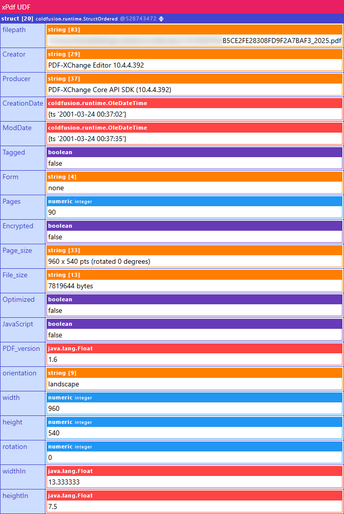
Here's a sample dump screenshot of the object (using cf_dump, a CFDump alternative)
Source Code
<cfscript>
// Xpdf pdfinfo is required https://www.xpdfreader.com/
public struct function getPDFData(required string filepath, string exePath="c:\xpdf\pdfinfo.exe") hint="Returns basic metadata and additionally identifies the orientation (landscape or portrait) of the first page of a PDF." {
	if (listlast(arguments.filepath, ".") neq "pdf" || !fileexists(arguments.filepath)) {
		throw(message="getPDFData: PDF file not found at: #arguments.filepath#");
	}
	if (!fileexists(arguments.exePath)) {
		throw(message="getPDFData: XPDF pdfinfo.exe not found at: #arguments.exePath#");
	}

	cfexecute(name="#arguments.exePath#", arguments="#arguments.filepath#", timeout="10", variable="local.pdfinfoOutput", errorVariable="local.pdfinfoError");

	if (len(trim(local.pdfinfoError))) {
		throw(message="getPDFData: pdfinfo error: #local.pdfinfoError#");
	}

	local.data = [
		"filepath": arguments.filepath
	];

	// generate data struct
	local.lines = listtoarray(pdfinfoOutput, chr(10) & chr(13), false, false);
	for (local.line in local.lines) {
		local.key = trim(listfirst(local.line, ":")).replaceAll("\s+", "_");
		local.val = trim(listrest(local.line, ":"));
		local.data[local.key] = (findnocase("date", local.key)) ? parsedatetime(local.val) : (listfindnocase("yes,no", local.val)) ? javacast("boolean", yesnoformat(local.val)) : (isvalid("integer", local.val)) ? javacast("int", local.val) : (isvalid("float", local.val)) ? javacast("float", local.val) : local.val;
	}

	local.data["orientation"] = "";
	if (local.data.keyexists("Page_size")) {
		local.sizeMatch = refind("\s*(\d+\.?\d*)\s*x\s*(\d+\.?\d*)\s*pts", local.data["Page_size"], 1, true);
		if (local.sizeMatch.pos[1] gt 0) {
			local.data["width"] = javacast("int", val(local.sizeMatch.match[2])); // First number (width)
			local.data["height"] = javacast("int", val(local.sizeMatch.match[3])); // Second number (height)
			local.data["rotation"] = javacast("int", 0);
			if (findnocase("rotated", local.data["Page_size"])) {
				local.data["rotation"] = javacast("int", val(local.data["Page_size"].replaceAll(".*\(rotated\s*(\d+).*", "$1")));
				if (local.data.rotation eq 90 || local.data.rotation eq 270) {
					local.temp = local.data.width;
					local.data.width = local.data.height;
					local.data.height = local.temp;
				}
			}
			local.data["widthIn"] = javacast("float", val(local.data.width) / 72);
			local.data["heightIn"] = javacast("float", val(local.data.height) / 72);
			local.data.orientation = (local.data.width gt local.data.height) ? "landscape" : "portrait";
		}
	}
	return local.data;
}
</cfscript>