Articles
Reading old WDDX files in 2026
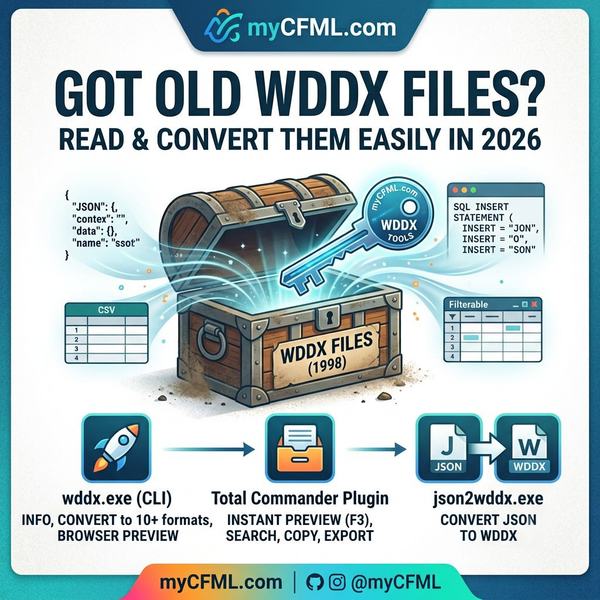
Every few months I open an archive folder and find WDDX files sitting there. A serialized query someone saved with <cfwddx> in 2006. An export from a Lucee app that has since been rewritten. A .dat file that turns out to be a WDDX packet wearing a disguise. WDDX was Allaire's XML data format from 1998, and if you have been doing ColdFusion long enough, you have made some of these files yourself.
It is worth remembering how early WDDX was. It shipped in 1998. SOAP did not exist yet, and neither did JSON or YAML. The binary formats we reach for now, like Protocol Buffers and MessagePack, were still a decade away. If you wanted to move a serialized query or struct between a ColdFusion server and something else in 1998, WDDX was one of the few things that could do it, and it was XML because XML was what everyone was betting on at the time. Allaire got there before most of the formats that eventually replaced it.
The problem is that opening one today is annoying. Double-click it and you get raw XML full of <recordset> and <field> and <char code='0d'/> escapes. If you want the actual data, you either write a throwaway deserializeWDDX() script or squint at the XML and reconstruct the table in your head. I got tired of doing both, so I built a set of tools that read WDDX and hand you back something you can use.
There are three pieces, all standalone Windows executables with no runtime and no installer.
wddx.exe
This is the main one. It does three things.
Info
wddx info report.wddx tells you what is in a packet: the WDDX version, the root type, and every query it can find, with row and column counts and the dot-path you would use to pull a nested one out. Add --json and you get the same thing as machine-readable output, which is handy if you are scripting a batch of files.
Convert
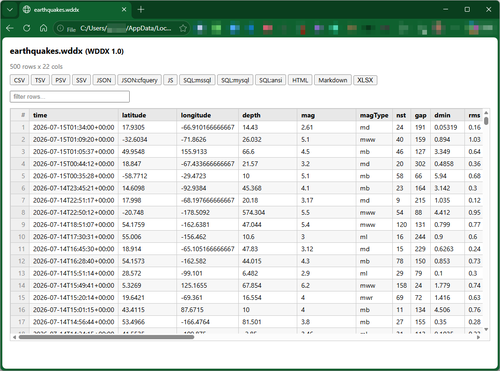
wddx convert turns a packet into something else. CSV, TSV, PSV, SSV, JSON (as an array of objects or in the ColdFusion COLUMNS/DATA shape), a JS variable assignment, INSERT statements for mssql, mysql, or ANSI SQL, HTML, Markdown, or XLSX. It takes a single file, a glob like C:\data\*.wddx, or a whole folder. NULL is preserved through all of it, which matters more than you would think once you start loading the SQL output somewhere.
Preview
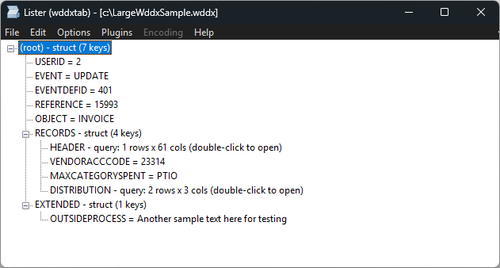
wddx preview report.wddx opens the file in your browser. It writes one self-contained HTML file, opens it, and exits. A query shows up as a sortable, filterable grid with a sticky header and row numbers. A struct or array shows up as a tree you can expand, with any queries nested inside rendered in place. Every export format is a download button, and what you download is exactly what the command-line converter would have produced, because it is the same code underneath.
JSON-to-WDDX
There is a fourth executable, json2wddx.exe, that goes the other way and turns JSON back into a WDDX 1.0 packet. I mostly added it for round-tripping and testing, but it is there if you need to feed WDDX to something old that still expects it.
The Total Commander plugin
Here is the part I am actually happiest about.
Total Commander is my file manager on Windows. It has been for years. If you have never used it, it is a two-pane keyboard-driven manager in the Norton Commander tradition, and the thing that keeps me on it is the plugin system. One of those plugin types is the lister plugin (WLX): you press F3 on a file and Total Commander hands it to whichever plugin claims that file type, which then draws the preview. I already lean on WLX plugins that render JSON and CSV as grids, and I wanted the same treatment for WDDX.
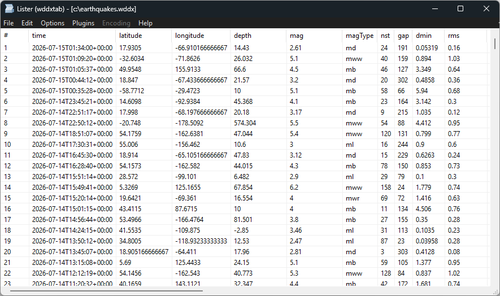
So wddxtab.wlx64 is a proper native lister plugin. Press F3 on a .wddx file and it opens as a grid or a tree, right inside Total Commander, no browser and no separate window. Click a header to sort. The row-number column renumbers to match. F7 is TC's search, and in the grid it filters the rows down to what matches. Ctrl+C copies the selection. Right-click gives you the same export menu the command line has, SQL dialect and JSON shape included. Double-click a query buried in a struct and it opens as its own grid, Backspace takes you back.
Installing it is one step: open wddxtab.zip from inside Total Commander and it offers to install itself, the same way the other WLX plugins do.
Building this part was the interesting bit. It is written in Go and compiled as a c-shared DLL, which means the Go runtime lives inside the plugin. That runs into a sharp edge: when Total Commander probes a plugin during install it loads the DLL, asks it one question, and immediately unloads it. A Go runtime does not survive being unloaded, so the very first thing the plugin did was crash Total Commander on install. The fix is to pin the module in memory so the unload never actually happens. Once that was sorted the rest behaved.
SheetJS
The XLSX export in the browser preview uses SheetJS Community Edition, embedded directly in the generated page so it works offline. SheetJS CE is a separate project under the Apache License 2.0, copyright SheetJS LLC. Credit where it is due; writing a correct XLSX encoder from scratch is not a rabbit hole I wanted to go down. The exact version I vendored is recorded in the repository.
Known limits
A few things worth knowing before you rely on it:
- Binary columns will not go into CSV, SQL, HTML, or XLSX. The converter reports an error for that column instead of writing garbage. Export as JSON or JS and the binary comes out as base64.
- The XLSX you download from the browser preview is built by SheetJS, so it is not byte-identical to the one
wddx convert --format xlsxwrites on the Go side. Both are valid and hold the same typed cells. Every other download from the preview does match the command line exactly. - The plugin is 64-bit only. Almost every Total Commander install is 64-bit now, so I did not build a 32-bit version.
- The preview leaves its HTML file in
%TEMP%, because the browser still needs it after the tool has exited. They do not clean themselves up, so that folder collectswddx-preview-*.htmlfiles over time. - The plugin grid does not have a status bar yet.
Get it
The tools and the plugin are on GitHub under the MIT License. Downloads and the full usage docs are in the repository README. If you have a pile of old WDDX files you have been avoiding, this is the thing that opens them.