Articles
Querying Parquet files directly from ColdFusion with DuckDB
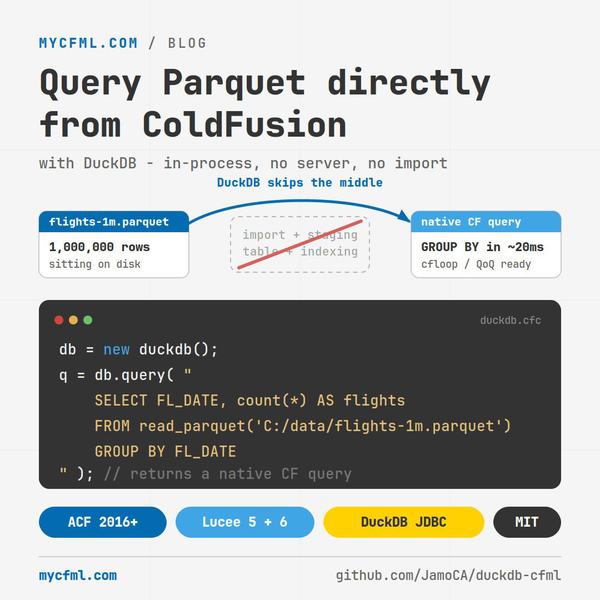
Reporting jobs have a shape I have come to dread. Pull a few million rows out of somewhere, push them into a staging table, index the staging table, run the actual query, throw the staging table away. Most of the work is moving data around so that the database can look at it. The part you actually care about is one GROUP BY.
DuckDB skips the middle. It reads Parquet files where they sit and runs SQL against them. No server, no import, no staging. It is an in-process database, so it lives inside your JVM the way SQLite lives inside a phone app.
There is a JDBC driver. ColdFusion runs on a JVM. I wanted to know how much stood between those two facts, so I spent a few days finding out, on ColdFusion 2016 specifically, because that is what most of my clients are still on.
The short version is that it works and it is quick. What I did not expect was how much of my time went on things no amount of reading the docs would have warned me about.
NOTE: Lucee developers have a thread from 2025 and extension available. (I'm not sure why this hasn't been added to Adobe ColdFusion yet.)
What it looks like
db = new duckdb();

q = db.query( "
    SELECT FL_DATE, count(*) AS flights, round(avg(DEP_DELAY), 2) AS avg_delay
    FROM read_parquet('C:/data/flights-1m.parquet')
    GROUP BY FL_DATE
    ORDER BY flights DESC
" );

db.close();
That returns a native CF query. You can cfloop it, run query-of-queries against it, hand it to a cfchart. The Parquet file is a million rows and never gets imported anywhere.
Parameters bind the way you would expect, with one rule I decided on early:
q = db.query(
    sql    = "SELECT region, sum(revenue) AS revenue FROM read_parquet('C:/data/*.parquet') WHERE year = ? GROUP BY region",
    params = [ ["value": 2026, "type": "integer"] ]
);
Types are never inferred from the value. A bare string binds as VARCHAR and that is that. Sniffing with isNumeric() is how a zip code turns into an integer and you lose the leading zero, and I would rather type six extra characters than debug that at 11pm.
DriverManager will not help you
This is the first thing that stops people, and it is why you may have read that JDBC drivers do not work with this.javaSettings.
They do. DriverManager does not.
DriverManager.getConnection() refuses to hand back a driver that is not visible from the calling classloader, and a jar loaded through javaSettings lives in its own classloader. The driver loads perfectly well. DriverManager just will not admit it exists.
Skip it and instantiate the driver yourself:
driver = createObject("java", "org.duckdb.DuckDBDriver").init();
conn   = driver.connect( javacast("string", "jdbc:duckdb:"), props );
Same trick works on Lucee. I confirmed DriverManager fails identically there, which was reassuring in a grim sort of way.
Ten demos, three engines
I ended up with ten demo pages that double as the test suite: driver smoke test, schema discovery, null handling, column name sanitization, parameter binding, writing a Parquet file back out, a million row aggregate, query-of-queries, INSERT/UPDATE/DELETE, and a persistent database file.
All ten pass on Adobe ColdFusion 2016.0.17, Lucee 5.4.8.2 and Lucee 6.2.7.16, from the same source.
Getting Lucee green took exactly one change, and I want to describe it properly because the failure gives you nothing.
A try/catch nested inside a finally block crashes Lucee 5's bytecode compiler. Not a runtime error. The component never compiles, and what you get is a bare java.lang.NullPointerException thrown from org.objectweb.asm.MethodWriter.visitMaxs. Nothing in that message names your file, your function, or anything you wrote. Adobe compiles the same code without a murmur.
The trigger was the most ordinary idiom in the world:
} finally {
    if ( isObject(stmt) ) {
        try { stmt.close(); } catch (any ignored) {}
    }
}
Move the swallow into its own method so the finally only contains a call, and Lucee is happy. I tested negative case labels, return inside a try with a finally, and typed catch with rethrow before I found it. All of those are fine. It is specifically the nesting.
Things the docs do not tell you
Statement.setMaxRows() is a no-op. The driver accepts the call, getMaxRows() cheerfully reports 0 back, and you get every row. I built a row limit on top of it and only caught it because my assertion said 10 and the page said 59. Bind LIMIT ? instead. DuckDB has supported parameters in LIMIT for years and the optimizer can actually use it.
query.columnList disagrees between engines. Adobe reports it alphabetized and uppercased. Lucee reports it in the order you selected. Select PassengerId, Name, Sex, Age, Fare, Cabin and Adobe hands back AGE,CABIN,FARE,NAME,PASSENGERID,SEX. The cell data is fine on both, since cells are set by name, but anything that builds CSV headers from columnList will look correct on one engine and scramble on the other.
Date cells come back as java.sql.Date objects, which is deliberate. getObject() on a DATE column can hand back a java.time.LocalDate, which CF2016 cannot coerce at all, so I use getDate(). What lands in the query is the Java object, and it behaves as a date everywhere I tested it: isDate(), dateFormat(), year(), dateAdd(), dateCompare(). It just stringifies as 2006-01-01 on Adobe and {ts '2006-01-01 00:00:00'} on Lucee, so do not build display output by stringifying a cell.
Query-of-queries works, including on columns full of nulls. This one I was braced for. On CF2016, a column built with querySetCell from inconsistently typed values will throw the moment you run QoQ against it. It holds here, and the reason is a bit lucky: for a null I skip querySetCell entirely rather than writing a placeholder. Those cells then behave as real SQL NULLs. IS NULL matches exactly them and Age > 0 excludes them instead of counting them as zero. Writing "" or 0 into the cell would have broken both.
The one that cost me a day
DuckDB ships four native libraries inside the jar, one per platform. On every application start it unpacks the right one into your temp directory and loads it from there. There is no cache and no reuse. Two days of development left me 13 copies of a 35MB file, about 400MB, because Windows cannot delete a DLL that is currently loaded and deleteOnExit() quietly fails.
So I fixed it. Strip the natives out of the jar, drop the one you need on java.library.path, and the driver takes a different code path that loads it in place. Cold start went from 783ms to 255ms and the temp litter stopped completely. I was pleased with myself for about a day.
Then the full test suite started throwing a 500 while a smaller page kept working.
A native library can be loaded only once per JVM, by one classloader. Unpacking to a randomly named temp file meant every application classloader got its own copy and nobody collided. Point them all at one fixed path and the moment your application restarts inside the same JVM, an idle timeout, an applicationStop(), a change to this.name, the new classloader cannot take a file the old one still holds:
UnsatisfiedLinkError: Native Library ...\duckdb_java.dll
  already loaded in another classloader
Every request fails until the server restarts. Request, applicationStop(), request gives 200, 200, 500, and 500 forever after.
It gets better. Once that static initializer has failed, later attempts throw NoClassDefFoundError, which extends java.lang.Error rather than Exception. ColdFusion 2016 cannot catch java.lang.Error from CFML at all. I tried a typed catch (java.lang.Throwable e) and it misses it too. There is no way to turn that into a friendly error page. It is a blank 500 with the reason buried in the server log, forever.
So the wasteful behaviour I was optimising away was the thing keeping it safe. I put it back. The fast path is still in the repo as an opt-in for deployments that start once and stay up, with the hazard written down next to it.
Is it worth using
For analytics and reporting against files you already have, yes. Aggregating a million rows off disk takes about 20ms and there is no server to install, no datasource to configure, nothing to keep running.
For anything transactional, no. It is an OLAP engine. Keep your orders in your real database.
The one caveat worth stating plainly: a CF query holds everything in memory, so do not SELECT * a million rows into one. Aggregate in DuckDB and bring back something small. That is the entire point of the tool anyway.
I also spiked the alternative approach, registering DuckDB as a proper CF datasource so you could use plain cfquery. It works, which genuinely surprised me. Adobe's connection pool handles the driver fine. Getting the datasource to provision reliably from CommandBox config is another matter, and I would not build on it yet.
The repository is at github.com/JamoCA/duckdb-cfml, demos and write-ups included. If you run it somewhere I have not, a real Linux box especially, or you manage to break it, I would like to hear about it.