Articles
cf-yourls: A ColdFusion component for the YOURLS URL shortener API
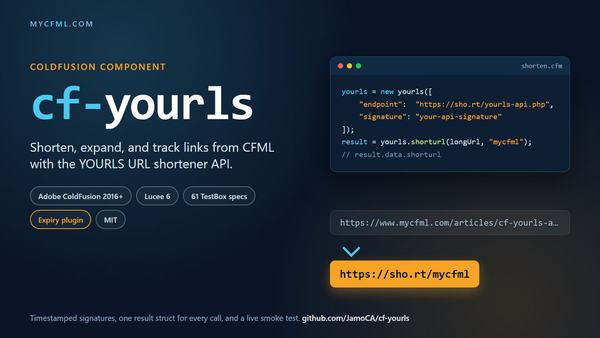
We have run a self-hosted YOURLS link shortener for years. It sits behind a short domain, gives marketing a vanity keyword for every campaign link, counts clicks, and costs nothing beyond the cost of an annually-renewed SSL certificate. The ColdFusion side of that was a single UDF I wrote in 2019 and patched in 2024. One function with seventeen arguments and a hard-coded endpoint that was intended for internal use only. It worked, but I could not release it to the public in the current state.
I finally replaced it with a component, and this time I wrote the tests first. cf-yourls is a single drop-in CFC that covers every action in the YOURLS 1.10.x API, the three actions added by the YOURLS-Expiry plugin, and a generic call() for anything else a plugin bolts on. It runs on Adobe ColdFusion 2016 and Lucee 6, and it has no dependencies beyond cfhttp.
Using it
yourls = new yourls([
	"endpoint":  "https://sho.rt/yourls-api.php",
	"signature": "your-32-char-signature"
]);

result = yourls.shorturl("https://www.mycfml.com/", "mycfml", "My CFML blog");
if (result.success) {
	writeOutput(result.data.shorturl);
} else {
	writeOutput(result.statusCode & ": " & result.error);
}
Every method returns the same struct: success, statusCode, message, error, data, and raw. The data key is the whole decoded JSON body from YOURLS, so nothing the server told you is thrown away, and raw is the undecoded text for the day you need to see exactly what came back. The statusCode comes from the body when YOURLS puts one there and from the HTTP response when it does not, because YOURLS mirrors its own status into the HTTP status and I did not want callers to have to check two places.
The methods map one to one onto the API actions: shorturl(), expand(), urlStats(), stats(), dbStats(), and version() for the built-ins, then expiry(), expiryStats(), and prune() for the Expiry plugin. The shorturl() method also takes the Expiry plugin's arguments, so a link can be created with a click limit or a time limit in one call. Bad arguments (an unknown stats filter, an empty URL, an expiry type other than click or clock) throw before any request is sent. Bad configuration throws from init().
The signature never leaves your server
YOURLS accepts a username and password, a plain signature, or a timestamped signature. The component defaults to the last one. It sends hash(timestamp . signature) along with the timestamp, YOURLS recomputes the hash on its side, and the window is 12 hours either way. The signature itself is never transmitted, which matters when the shortener is on a shared host and you do not control the logs.
CFML's hash() returns uppercase hex and PHP's hash_equals() is case sensitive, so the digest has to be lowercased or every request gets a polite "Please log in." And YOURLS 1.10.5 changed the default algorithm from md5 to sha256 and added a hash parameter to name it. The component sends sha256 by default and has a hashAlgo setting for sha384, sha512, or md5 if you are stuck on an older install.
What I learned from CFML cross-platform testing
My 61 unit tests ran offline. An offline setting makes the component return the request it would have sent instead of sending it, so most specs just assert on the parameters, and MockBox stubbed the one send() method when a spec needs a canned response body. While that covers the component's own logic, it cannot cover what YOURLS actually does. A live smoke test page against our own install revealed five things the specs didn't.
-
Empty JSON arrays. For about a day, every
shorturlrequest to our server came back HTTP 200 with a body of[]and no link was created, while every other action worked. In YOURLS 1.10.6 the only code path that produces that is a plugin returning null from theshunt_add_new_linkfilter. It cleared up after a deprecated plugin was deactivated on the server. My first UDF version of the component treated any HTTP 200 as success, so it would responded with "success" when the link was never created. It now reports a non-object body as a failure with a message that says what came back. -
An error code that is not an error. Once the server was fixed, successful
shorturlresponses from 1.10.6 arrived with"code":""and"errorCode":""next to"status":"success". My success check asked whether anerrorCodekey existed, so every link that was created came back as a failure. Only a non-emptyerrorCodecounts now. -
Two tabs in a key name. The Expiry plugin's "no expiry data set" reply has a key that is literally
expiryfollowed by two tab characters. This bug is a typo in the plugin's PHP. I've added a work around to trim whitespace from top-level response keys sodata.expiryawlays reads correctly. -
Duplicates. The YOURLS docs say shortening a URL that already has a short link returns a 409 with the existing short URL in the body. That only happens when
YOURLS_UNIQUE_URLSis on. we have it configured asoffso we can use it to track different campaigns without having to add parameters to the URL. The same long URL with a new keyword gets a new link and a 200. The component handles both, but if your code depends on the 409, check that setting first. -
CFML reserved keywords should be availabled. Claude Code initially named a local variable
clientin a spec. While Adobe ColdFusion shadows the scope withlocal, the tests alls passed as "green". Lucee does not behave the same, so a bareclientresolved to the client scope and three specs failed with "client scope is not enabled." This is not the first project where that has bitten me, and the fix is the same every time: never name a local after a CFML scope. As a result of this, I identified all reserved keywords for Adobe ColdFusion, Lucee, Boxlang and Microsoft SQL Server for used as a "skill". I don't believe that this information existed before and each platform has their own set of rules.
Smaller things: cfhttp uses getasbinary="never" (due to experienced CF-bugs in the past) and charset="utf-8" so the body is always a string.
Source code
The component is available on GitHub at https://github.com/JamoCA/cf-yourls under the MIT license.